Hello and welcome back!
This week has seen me finish off the Unity Essentials pathway and begin to plan my first solo project to put my skills in action.
Publishing Essentials – Add a bonus scene
In this lesson I chose one of three options to create a bonus scene within my portfolio. I decided to go with Option 1 to combine all my rooms together as Option 2, to make an art gallery, didn’t appeal to me. Option 3, to build my own 3D open world collectible did appeal to me, however, it’s similar to what I’m thinking about for my solo project, so I decided to give this one a miss.
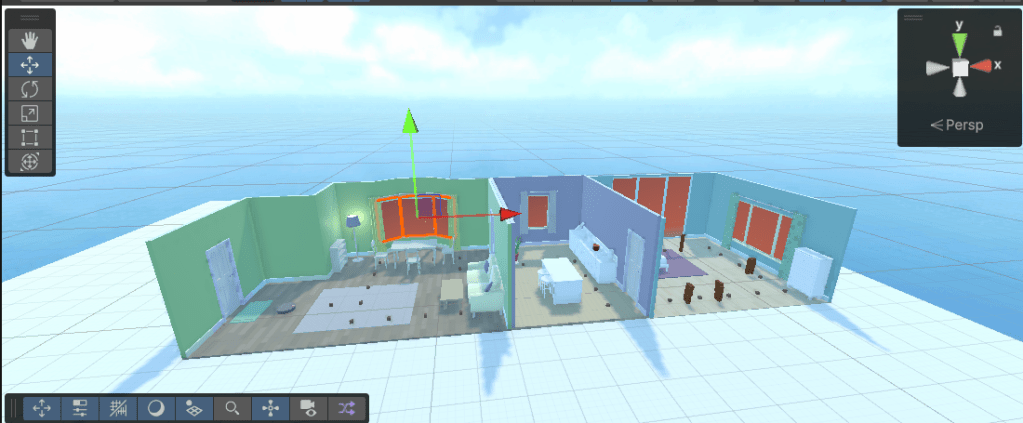
First I combined all my rooms together, then added more collectibles throughout the other rooms to extend the game. I also added some of the blocks from the child’s bedroom to act as obstacles for the player to drive through.

Finally I played with adding a skybox to my scene and changed the material on the windows of each room to reflect the same colours as the skybox. This was something that I didn’t learn within the pathway, but a quick play around with the settings and components meant I could add the skybox in with little effort.
You can find an updated version of my portfolio with the bonus scene, here:
Unity Play | Dan’s Unity Essentials Portfolio 2 game
Capture a video of your project
To finish off the mission, (and the pathway), I learned how to add the recorder package to my project using the Package Manager. The recorded a demo of my bonus scene, which you can watch below.
Pathway Completed
And with that I’ve completed the Unity Essentials Pathway. I’ve really enjoyed getting stuck into the basic fundamentals of developing in Unity over the past few weeks and can now say that I know how to do the following within Unity:
- You explored the Editor interface.
- You mastered 3D scene navigation and passed the Scene view flying test.
- You created a mural in the Scene view.
- You added furniture to a kid’s bedroom.
- You made a bouncy ball with a custom material and physics.
- You made a tower of prefab blocks.
- You configured the skybox, lighting, and camera.
- You create an immersive soundscape in a kitchen.
- You added a player movement script.
- You coded a simple rotating object.
- You coded a collectible that spawned a particle effect.
- You set up a 2D room with specialized 2D components.
- You completed a 2D puzzle game, including an animated 2D pet.
- You set up your work as a single portfolio project.
- You published to WebGL.
- You recorded a video of your work.
Next up on my learning journey, I’ll be taking on the Creative Core Pathway to really get to grips with Unity’s engine. Before then, however, I want to have a go at putting my new skills to the test. I’ve decided to start my first solo project which is to build a 3D version of Snakes and Ladders. I’ll come back to the Unity Pathways soon, but for now, I’ll be writing up my first Development Diary soon and getting stuck into making 3D Snakes and Ladders!
 Dan Does Games
Leave a comment