Hello and welcome back.
Life has a funny way of getting in the way some times, and between work and life commitments, my progress has been slow over the past few weeks. However, I’m still here giving it a go!
The Spinning Player
At the end of the last sprint I was left with a bug where my player would randomly go off spinning as they moved along the board. In this sprint I decided to look into that bug and see if I could resolve it.
After a bit of searching I managed to find that I was using the incorrect mesh on my player. I’d added a capsule mesh to the player for interacting with physics, but as a capsule would do, it cause the player to topple over when they moved. I changed this to a cylinder mesh and now my player moves much smoother, though not perfect. I suspect ideally I need to create a mesh that fits perfectly on my character, but that’s a skill I haven’t learnt yet. Additionally, when my player moves their limbs are still static, so I think there’s some more research a learning I need to put in the get the player moving just how I want them too.
The were also some additional physics properties I needed to add to my character to help them stay up straight. I realised that I needed to add a Physics Material to my character and set the Dynamic Friction, Static Friction, and Bounciness to zero. This would ensure that my character wouldn’t slip and slide all over the place.
Strengthening the Environment
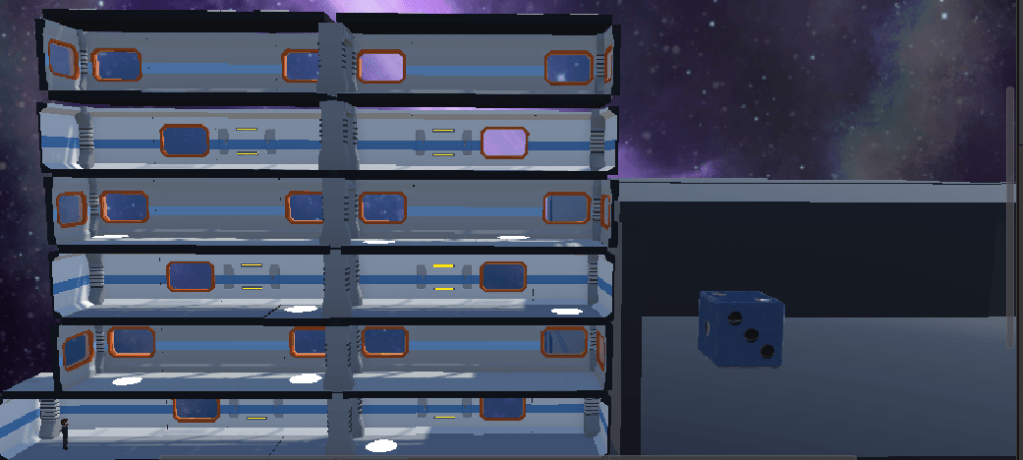
Whilst working out my player movement I also noticed some additions I needed to make to my environment. First, if I continued to let my player carry on walking to the edge of the board, they would fall off. That’s not supposed to happen so I added walls and columns at the end of each row to make it look like the character is contained within the ship rather than able to fly off into open space.
I also added a ceiling to my last row to enforce that contained environment. Now it looks a lot more like my character is actually travelling through a ship or a space station. After a few more minor adjustments I can now say that I have a game board where a single player can move, step onto the teleport pads and make their way to the top of the game/finish line. Great progress!
Adding the Dice Area
Now that I had the foundations of my game board and player, I turned my focus for the rest of this sprint to creating my dice rolling area. I decided this would be a small 3D space in the bottom right of the screen where the die could roll about and the result be shown in a UI element at the top.
I did a little research on how to do this and found the below tutorial made by Midnight Oil Software LLC which gave me a great starting point.
After watching this I created my 3D rollable area and picked a die from the Unity Asset store. Like the team in the tutorial I picked the d6 die Dice from Armor and Rum.
Dice d6 game ready PBR | 3D Tools | Unity Asset Store
After adding the die in the rollable area, I next need to create a script for rolling the die. The tutorial itself didn’t quite give me everything I would need to script the die, so I thought I’d come back to that in a future sprint after I’ve done a little more research.
Conclusion
Despite struggling to get time to develop in places, I do feel as though I’ve come a long way over three sprints. I’m enjoying the progress that I’ve made so far, however, I can see that I’m starting to hit the limits of my knowledge so far and find myself researching snippets of how to do stuff more and more. Therefore, I’ve decided to pause my development on my game for the time being and head back to Unity Pathways.
First however, I’m going to be using the next couple of weeks to start work on the other side of my game development journey, which is to write about my own personal history with computer games. Games have played a massive part in all stages of my life so far, so I’m looking forward to revisiting some of the past games and consoles from throughout my history on this earth.
I’ll be releasing some of that journey on this blog over the Christmas period, before heading back to Unity Pathways in the new year to carry on my development journey.
Until next time,
Dan
 Dan Does Games
Leave a comment